NexiCharge
EV charging management for residential communities — one system, three very different users.
Mobile Web
Desktop Web
App
Timeline
Feb. 2025 - Jul. 2026
My Role
Product Design, Requirement Clarification, Information Architecture (IA)
Tools
Figma, Figma Make, Claude Code
Team
PM, Frontend/Backend Engineers

Project Background
Our parent company distributes charging hardware from multiple brands but has no software of its own. Adding one:
gave sales a reason for customers to choose us
stayed brand-agnostic, so it could work with hardware customers already owned
became step one toward a larger goal — an energy management system the company plans to bring into the US market
The Challenge
This system serves three roles across three separate interfaces:
gave sales a reason for customers to choose us
stayed brand-agnostic, so it could work with hardware customers already owned
became step one toward a larger goal — an energy management system the company plans to bring into the US market

Challenge 1 — Deciding From Scratch What Deserves Attention
With no existing version to reference, every decision about what maintenance providers needed to see immediately — and what was just noise — had to be made from zero.
Challenge 2 — One Dataset, Three Very Different Views
Each role needs a different slice of the same data, and some of it shouldn't cross over at all. Staying brand-agnostic added another layer: the raw data coming in was never uniform.
Challenge 3 — Money Changes Hands, So Records Have to Be Trustworthy
Shared chargers mean payments across multiple parties. Without clear, auditable records, billing disputes were only a matter of time.
Challenge 4 — Flexible Enough for Every Community, Safe Enough for Any
Every community has its own power capacity, so admins set their own total load and alert range. The challenge was handing them that control while keeping the settings hard to get wrong.
Design Approach
Interviews Became the Benchmark
This was a 0-to-1 product with no existing version to reference. I interviewed maintenance providers to learn what they needed to see and act on first. Remote restart came up again and again.
Design Order Became Build Order
As the only designer, the order I designed became the order engineering built. Before wireframing, I worked through the PM’s draft spec with them to align on which features came first—and what mattered most within each one.

Choosing a Foundation We Could Extend
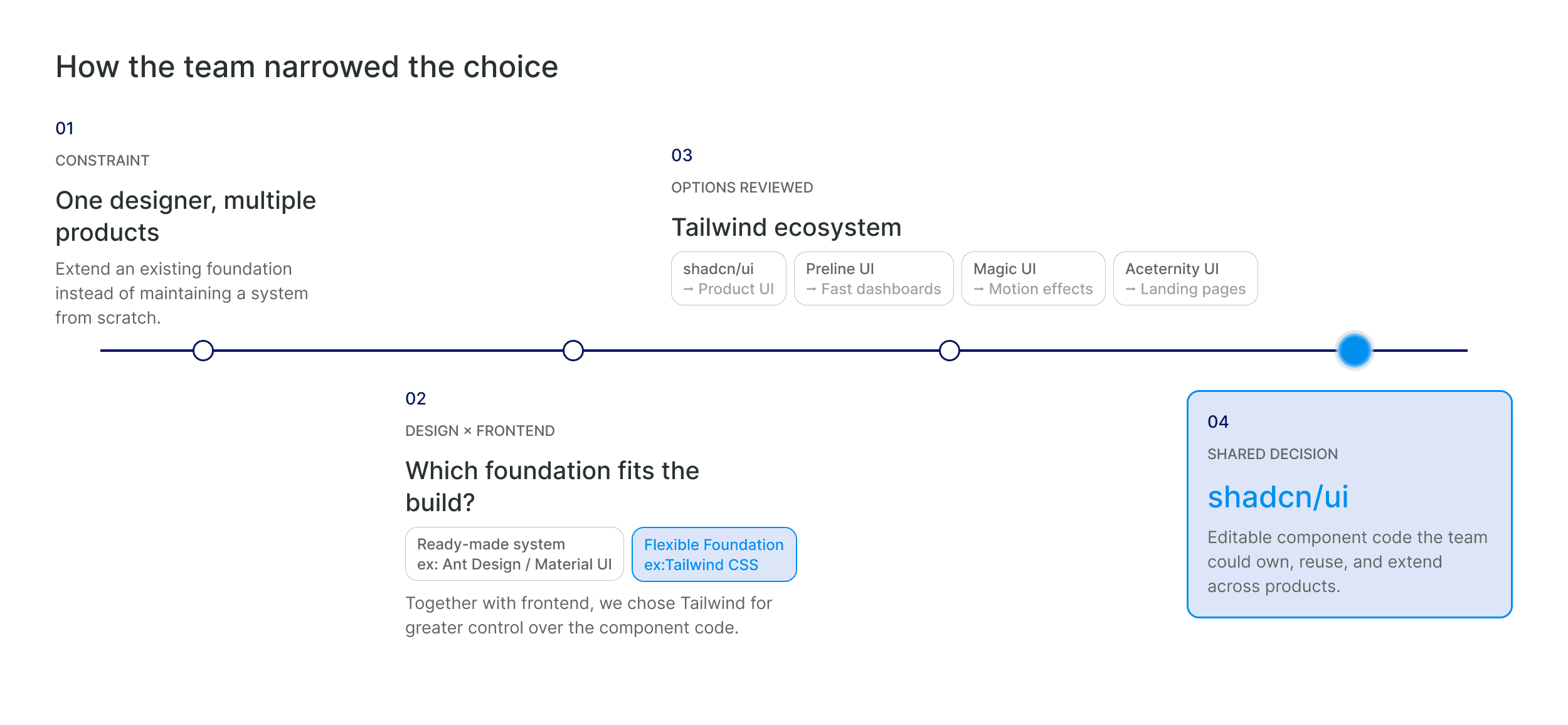
Both the resident app and admin platform needed to share the same UI foundation. Together with frontend, we chose Tailwind CSS and shadcn/ui so we could own, reuse, and evolve the component code across products.
Prototypes Sales Could Actually Use
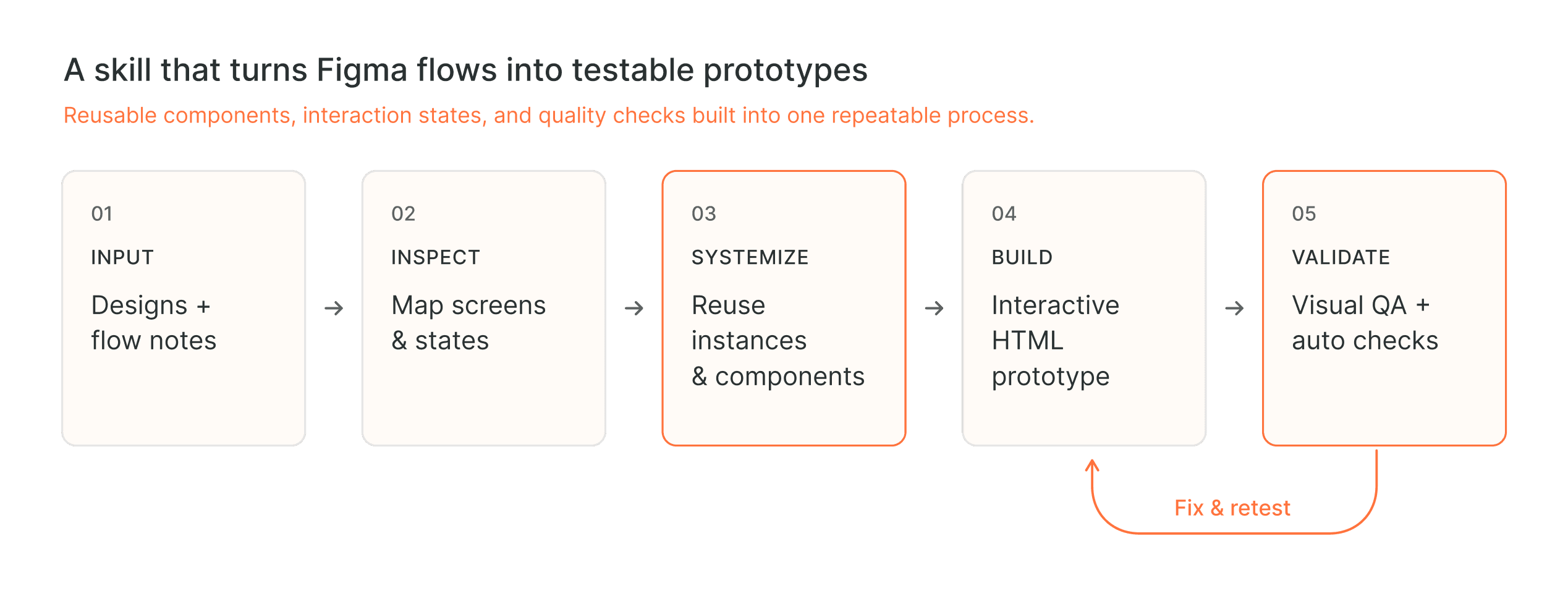
We met with our parent company’s sales team every two weeks—they would sell the product and heard from customers daily. Static mockups didn’t land, so I used AI to build high-fidelity interactive prototypes they could click through and respond to. When the AI output drifted from the mockups, I wrote a skill to keep it faithful to the design.
Design Solution 1 — Owner Mobile Web
Eleven Technical States, Five Clear Statuses
The hardware reports eleven technical states. Working with the backend team, I mapped them into five user-facing statuses that helped EV owners quickly understand what they could do next.

Names and sensitive data have been anonymized for confidentiality.
Sharing, With a Verified Handshake
Owners can open their private charger up to another member, but only after UUID-based verification confirms who's on the other end.

Reserve Charging to Save
Owners can schedule a charging session in advance to land in a cheaper rate window — the same time-based rates admins configure on their end.

Design Solution 2 — Maintenance Provider Dashboard
Prioritizing What Actually Matters
Alerts are filtered down to what needs action, and remote restart sits front and center instead of buried in a menu.

Design Solution 3 — Community Admin Dashboard
Flexible Settings, Visible Guardrails
No two communities have the same capacity needs, so admins can configure their own zone allocation and total load. The warning buffer is selected from preset percentages to keep it within a sensible range. These settings are then reflected on the dashboard as the capacity ceiling and warning threshold.

Rates and Records Admins Can Stand Behind
Shared chargers mean money moving between multiple parties. Rates are fully customizable, and a reporting view lets admins reconcile usage and charges with residents directly.

View and edit weekly rates by clicking or dragging on a simple 24-hour color grid.

Use a template to create last month’s report.
Market Validation
With development complete and launch still ahead, we began approaching potential distribution partners. After walking through the full product, one of them pointed out what they saw as its strongest selling points — which mapped closely to the decisions we'd made:

What's Next
That conversation also mapped out where this goes next:
Rate presets — The current rate settings can handle any pricing structure. The next layer is one-click presets for the most common one: Taipower's time-of-use tiers.
Deeper load management — accounting for switches and three-phase power, not just contracted capacity
Broader hardware compatibility — expanding the range of EV chargers the system can connect to
Longer term, this system was step one toward a larger goal: an energy management platform covering more than charging. I'd already completed the design system and initial screens for that platform, laying the groundwork for what came next.
