Designing at Speed with AI
Six-module internal console, one designer, two months — and how I decided what to hand off.
Desktop Web
Timeline
May. 2026 - Jul. 2026
My Role
Product Design, AI-Assisted Design Workflow, Design QA
Tools
Claude Design, Claude Code
Team
PM, Frontend/Backend Engineers

The Problem
Our EV charging platform brought in two kinds of customers — and nowhere internally to manage them.
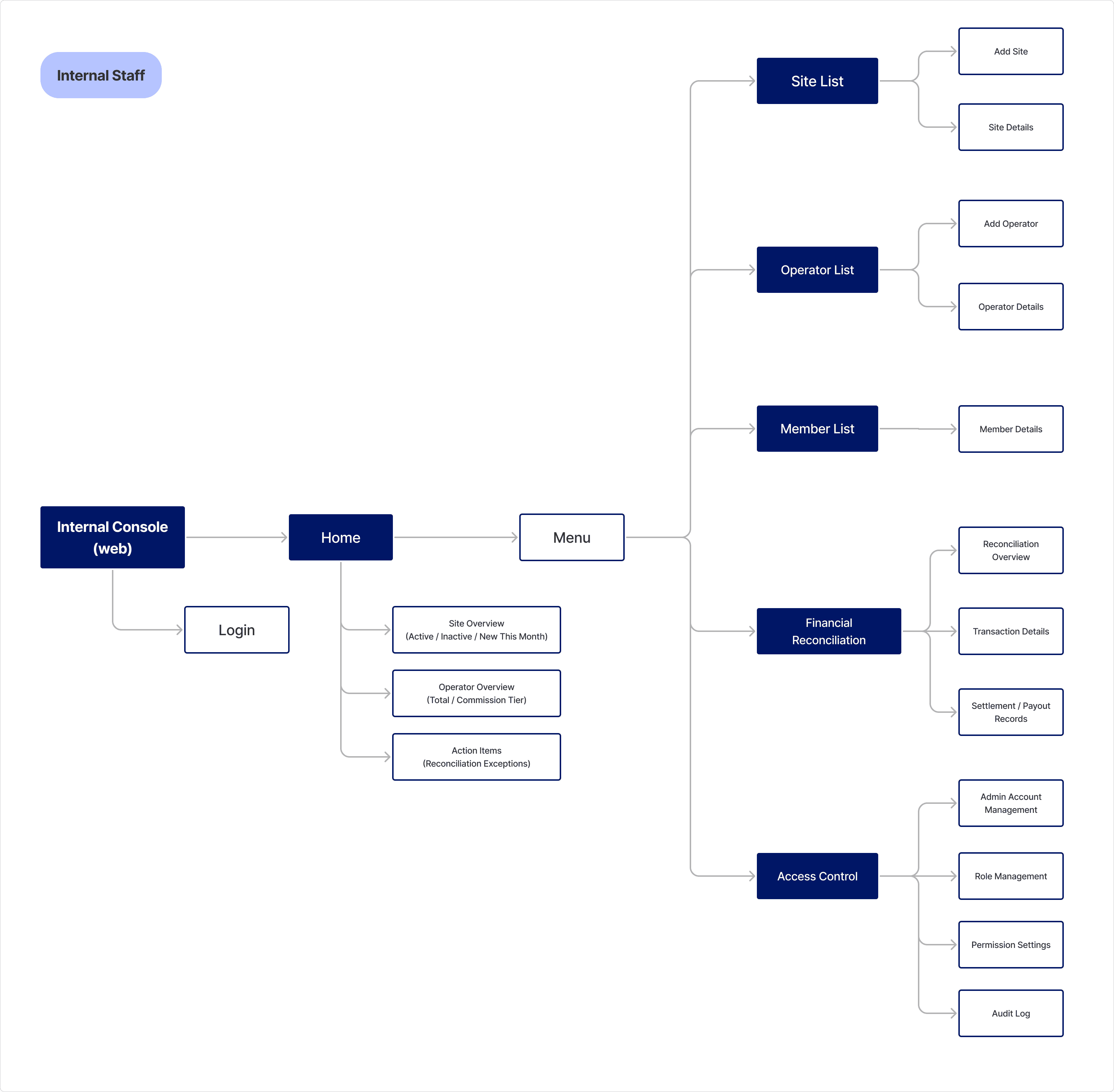
NexiCharge, our EV charging system for residential communities, serves maintenance providers on the B2B side and EV owners on the consumer side. The console had to cover:
Home — an overview of sites and maintenance providers, plus pending items like reconciliation exceptions
Sites — every charger location across all communities
Maintenance providers — the B2B accounts servicing them
Members — EV owners and their accounts
Financial reconciliation — payments, settlements, records
Permissions — who on the team can see and do what
Why AI
One designer, two months, and a console that usually takes three to five.
I was still finishing the final revisions on NexiCharge, and the console had a July launch target. Three to five months is the typical design timeline for an enterprise console with multiple roles and permission logic. Two months, part-time, wasn't going to happen the usual way.
So I decided where my time was worth the most. This was an internal tool: its users were colleagues, and getting flows and business rules right mattered more than pixel-perfect components. That tolerance made it safe to hand the first pass to AI, and left my own hours for what AI couldn't judge.
Building the Workflow
The design system stayed the same. The tools around it changed.

Stage 1 — Claude Design
I set up our existing design system in Claude Design and generated pages from it. It got the work started, but four problems kept getting in the way:
Finished pages wouldn't reopen when I came back to discuss them
Flows couldn't be walked through end to end to validate the design
Pages drifted apart, with shared elements styled differently from screen to screen
The design system was hard to update precisely
Those four problems are what led to Stage 2.
Stage 2 — Claude Code
Package the design system as a skill — The skill held the rules shared across pages, like how status labels and tags are used, so every screen stayed consistent. When a rule changed, I could ask Claude Code to update the skill directly.
Generate HTML pages locally — Local files opened reliably, and screens in each feature linked up, so every flow could be walked through before handoff.
Push to GitHub for the frontend team — I'd designed by module, so I proposed one repo per module, letting any module be iterated on later without touching the rest. Claude Code committed and pushed each one, writing the commit messages as it went.

Reviewing the Output
For every screen, I kept only what helped people finish the task quickly.
AI aims for completeness and fills every slot, but each extra line is one more thing to read and hesitate over. So I started from what each screen was for and cut what didn't serve it.
Business rules were mine to define, not AI's to guess.
Claude followed our design system roughly 90% of the time, by my count, which was good enough for an internal tool. But a design system describes how things look, not how a product works.

Whether a PID resolves to real meters, what our UUID format looks like — these rules live in our system, not in a design system. I defined them; AI styled what I defined.
Result
Six scattered areas of work, designed into one console in two months.
The team can now manage both sides of NexiCharge's customers, B2B and consumer, in one place without switching tools or reconciling by hand. The design has been handed off to the frontend team and is scheduled for development once engineering capacity opens up.

